# How to Use Firebase Emulator iOS Part 2 - Firestore
This is part 2 of the Firebase Emulator iOS series, explaining Firestore functionality which is storing, fetching, and deleting data.
If you haven't followed part 1 of this series, please go see it before you begin.
Quick note: I'm going to touch a little bit about the authentication part because it involves deleting data.
## 1. Set local environment
You might want to
By default, XCode has two configurations: Debug and Release
You might want to use debug for emulators and Release for production.
### 1 - Create Configuration.swift and add the following code.
```
// Configuration.swift
import Foundation
import Firebase
class Configuration {
static let shared = Configuration()
func auth() -> Auth {
#if DEBUG
let auth = Auth.auth()
auth.useEmulator(withHost: "localhost", port: 9099)
return auth
#else
return auth
#endif
}
func FirestoreSettings() -> FirestoreSettings {
let settings = Firestore.firestore().settings
#if DEBUG
settings.host = "localhost:8080"
settings.isPersistenceEnabled = false
settings.isSSLEnabled = false
Firestore.firestore().settings = settings
return settings
#else
//default setting
return settings
#endif
}
}
```
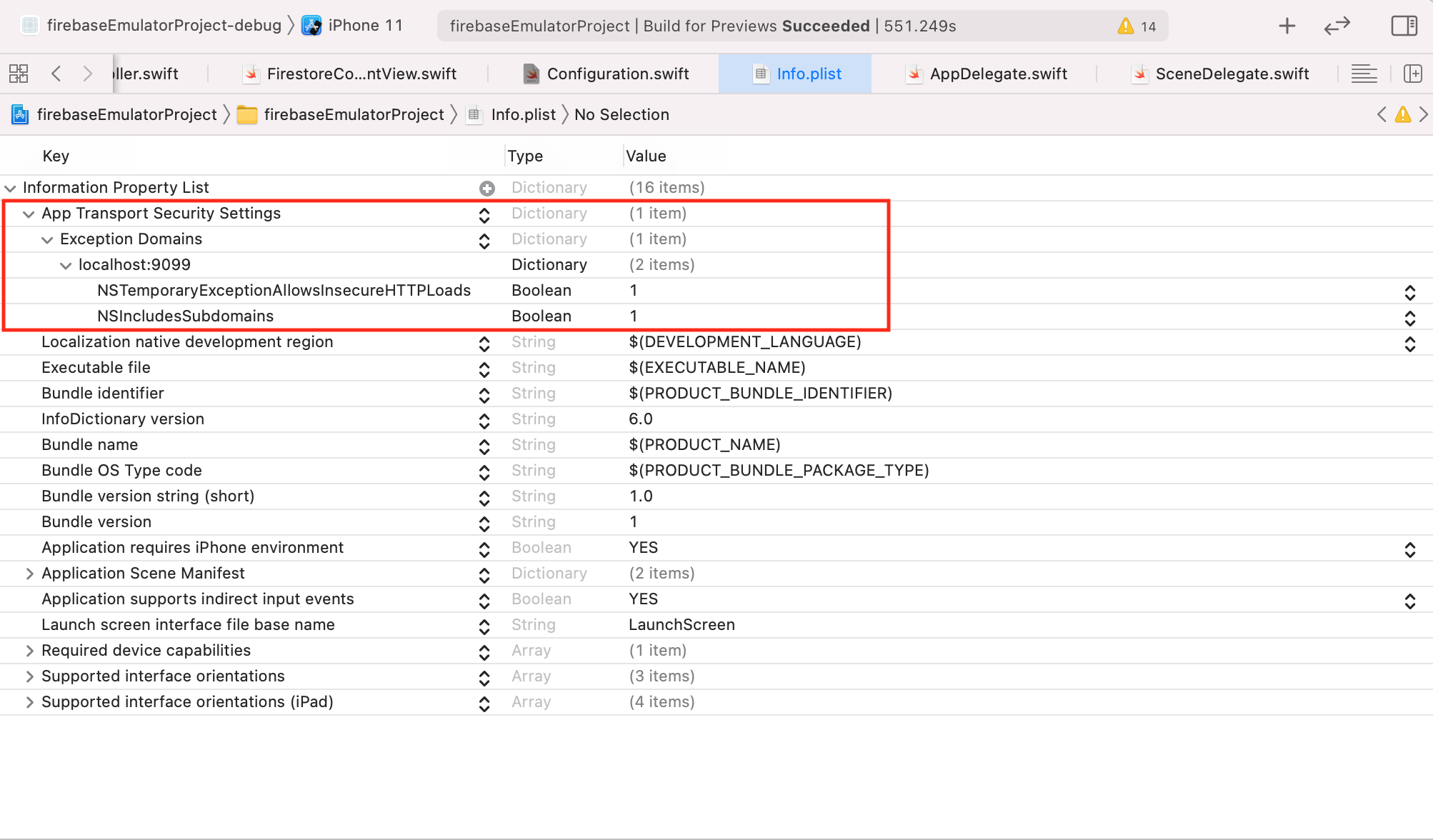
### 2 - Enable App Transport Security Settings for allowing localhost
By default, XCode doesn't allow non-SSL sites (i.e. http://example.com) for security.**
In info.plist
・Add **"App Transport Security Settings"**
・Under the "App Transport Security Settings", add **"Exeption Domains"**
・Under the "Exeption Domains", add **"localhost" and set it as Dictionary**
・Under the "localhost", add **"NSTemporaryExceptionAllowsInsecureHTTPLoads"** and **"NSIncludesSubdomains"**
## 2. Firestore
### 1 - Configure a FirebaseApp shared instance, typically in your app's application:didFinishLaunchingWithOptions: method in AppDelegate.swift.
```
// AppDelegate.swift
import UIKit
import Firebase
@main
class AppDelegate: UIResponder, UIApplicationDelegate {
func application(_ application: UIApplication, didFinishLaunchingWithOptions launchOptions: [UIApplication.LaunchOptionsKey: Any]?) -> Bool {
// Override point for customization after application launch.
FirebaseApp.configure()
return true
}
```
### 2 - Create a new swift file (i.e. FirestoreContentView.swift) and set it as HonstingController inside SceneDelegate.swift.
```
// SceneDelegate.swift
import UIKit
import SwiftUI
class SceneDelegate: UIResponder, UIWindowSceneDelegate {
var window: UIWindow?
func scene(_ scene: UIScene, willConnectTo session: UISceneSession, options connectionOptions: UIScene.ConnectionOptions) {
let firestoreContentView = FirestoreContentView()
if let windowScene = scene as? UIWindowScene {
let window = UIWindow(windowScene: windowScene)
window.rootViewController = UIHostingController(rootView: firestoreContentView)
self.window = window
window.makeKeyAndVisible()
}
}
```
## 3- Create a simple view and make a firestore function for storing, fetching and deleting data.
### Saving data
In this example, we are going to save the user name and age.
```
// Model
struct UserInfo: Codable, Identifiable {
var id = UUID()
var username: String
var age: String
init(dictionary: [String: Any]?) {
self.username = dictionary?["username"] as? String ?? ""
self.age = dictionary?["age"] as? String ?? ""
}
}
```
```
//ViewModel
class FRContentViewModel: ObservableObject {
@Published var userInfo: UserInfo?
func storeUserInfo(username: String, age: String) {
let data = ["username": username, "age": age]
let auth = Configuration.shared.auth()
auth.signInAnonymously { result, error in
if let error = error {
print("failed to singn in anonymously", error.localizedDescription)
return
}
guard let uid = result?.user.uid else { return }
let firestore = Firestore.firestore()
firestore.settings = Configuration.shared.FirestoreSettings()
firestore.collection("userInfo").document(uid).setData(data, merge: true) { error in
if let error = error {
print("error", error.localizedDescription)
return
}
print("Successfully stored data into Firestore")
}
}
}
```
```
// View
struct FirestoreContentView: View {
@State private var username = ""
@State private var age = ""
@ObservedObject var viewModel = FRContentViewModel()
var body: some View {
VStack {
Text("Firestore Emulator 🔥")
.font(.title)
.padding(.bottom)
.foregroundColor(.blue)
TextField("Enter username", text: $username)
.padding(20)
.overlay(RoundedRectangle(cornerRadius: 10).strokeBorder(Color.gray))
TextField("Enter age", text: $age)
.padding(20)
.overlay(RoundedRectangle(cornerRadius: 10).strokeBorder(Color.gray))
Button(action: {
viewModel.storeUserInfo(username: username, age: age)
} ) {
Text("Save data")
.padding()
.foregroundColor(Color.white)
.background(Color.blue)
.cornerRadius(15)
}
}
.padding(.all)
}
}
struct FirestoreContentView_Previews: PreviewProvider {
static var previews: some View {
FirestoreContentView()
}
}
```

### 2.Fetching data
Let's add a button and text objects and the username and the age that has been stored in the Firestore database.
```
//View
Button(action: {
viewModel.fetchUserInfo()
} ) {
Text("Fetch data")
.padding()
.foregroundColor(Color.white)
.background(Color.green)
.cornerRadius(15)
}
Text("UserName: \(viewModel.userInfo?.username ?? "")")
Text("Age: \(viewModel.userInfo?.age ?? "")")
```
```
// ViewModel
func fetchUserInfo() {
guard let uid = Auth.auth().currentUser?.uid else { return }
let firestore = Firestore.firestore()
firestore.settings = Configuration.shared.FirestoreSettings()
firestore.collection("userInfo").document(uid).getDocument { snapshot, err in
if let err = err {
print("faield to fetch fata", err.localizedDescription)
return
}
let userInfo = UserInfo(dictionary: snapshot?.data())
self.userInfo = userInfo
}
}
```

### 3.Deleting data
Let's add a button below the text for age for deleting the user information that's been stored in Firestore.
```
// View
Button(action: {
viewModel.deleteUserInfo()
} ) {
Text("Delete data")
.padding()
.foregroundColor(Color.white)
.background(Color.red)
.cornerRadius(15)
}
```
```
// ViewModel
func deleteUserInfo() {
guard let uid = Auth.auth().currentUser?.uid else { return }
let firestore = Firestore.firestore()
firestore.settings = Configuration.shared.FirestoreSettings()
firestore.collection("userInfo").document(uid).delete { err in
if let err = err {
print("failed to delete", err.localizedDescription)
return
}
print("Successfully deleted data in Firestore")
}
}
```

*If you encounter an error in the XCode console as below, try to run on a different simulator. I'm not sure the exact reason but this can be a bug from Firebase.
```Unkown: An internal error has occurred, print and inspect the error details for more information``
That's all for this part 2 of Firestore Emulator for iOS series.
The next post will be the Realtime DB so stay tuned!
Full Code available at: https://github.com/akaakoz/firebase-emulator-ios
Reference: https://firebase.google.com/docs/emulator-suite?hl=en